How to make money online 2014

Click on this image to see how to make money online 2014

How to make money online 2014

Click on this image to see how to make money online 2014

How to make money online 2014

Click on this image to see how to make money online 2014

How to make money online 2014

Click on this image to see how to make money online 2014

How to make money online 2014

Click on this image to see how to make money online 2014

Showing posts with label Template. Show all posts

Wednesday, 5 February 2014

Five Best Commenting Platforms for your Blog

Blogs typically have their own commenting section in their pages. However, for some reasons, it is common for some blogs to deactivate their commenting section due to some strategic reasons. It is always a good practice to have a vibrant commenting section to initiate conversation amongst users. After all that is the purpose of having a blog. This can be more so, especially if it is a third-party commenting platform. They will provide a good measure of connection to other social websites like twitter, Facebook, just to name couple of them. They can possibly bring in more readers and build a community by itself.
There are scores of well-known third-party commenting platforms that you can choose for your blog. Here are the top five commenting platforms you may want to try for your website/blog. Each has its specialty and features.
  1. Of the many third-party commenting platforms, ‘Disqus’ is a platform you may not like to miss, including the many add-ons that come with it. Some of the special features are:
    • It has an intuitive interface and everything is in real time. That means you get every comment emailed to you so that you can reply to them immediately or simply follow them.
    • It is possible to attach media along with comments, because, it is integrated with sites like You Tube and Flickr.
    • You can use services like Facebook and Twitter, and use their login identity for sharing stuff. The fact is that the USP of Disqus closely connects to social networks as well as its abilities to keep track of comments.
    • There are moderation tools and anti-spam technology incorporated so keep it safe from spammers. It is possible to exclude specific words within comments. You can have blacklists or white lists as you want.
    • Have plugin modules for Drupal, WordPress besides excellent support for mobile devices. It is also possible to integrate with Tumblr and Blogger.
    best popular comment platforms
  2. IntenseDebate is another good commenting platform to which you can give your thoughts. It comes from automatic, the people behind WordPress. See what they offer. The popularity of IntenseDebate is increasing day by day.
    • It is possible to integrate with community tools like Facebook Connect Open ID.
    • You can reply to comments through e-mail, get email notification, and have nested comments facility.
    • Offers full social media integration with user’s own profiles.
    • Akismet provides Spam protection. There is provision for comment moderation, blacklists and while lists. It is possible to assign jobs to admin with appropriate privileges.
  3. The third most popular commenting platform is Livefyre. Everything here happens on real time. Therefore, you can reply to comments instantly and receive comments at the same time. Some of the better-known names that use Livefyre are The Sun, The New York Times, AOL, and Bloguin.
    • Livefyre offers excellent connectivity with social networks like its other third-party comment support competitors with the added advantage of tagging Facebook friends. This feature lets you bring in more people into a conversation.
    • There is a live stat on commenting and listening.
    • All users can have their own profile on Livefyre with information on email responses and links, Comments are extremely SEO friendly, which means that your site’s page rank will improve.
    • High quality tools for moderation and spam control.
    • Excellent interface which is highly intuitive and easy to use.
    • Livefyre is free to use with standard features, but for customization, you will need to pay.
  4. Echo is another feature rich third-pay platform you can consider for your website’s commenting needs. It is complete in the sense that it can, include forums, polls, real time sharing, and comments. Echo is better suited for business rather than personal blogs. A unique feature is its ability to synchronize with Facebook fan pages and Twitter conversation. Major users of Echo are The Washington Post, ESPN and others.
  5. If you are inclined for using Facebook more than others are, then Facebook Comment Box will serve your purpose in many ways. Feature wise it is a little less than what its competitors are. The commendable features are relevancy with comments from friends presented at the top, moderation tools, grammar checkers and many more. What you may not like is the frame structure of the tool.
So, these were some of the commenting platforms that you can integrate with your blog or website. All the specified platforms are reliable and safe, as they offer quality security against spammers and abusers. You can definitely use all of them. So, integrate any of these according to your preferences and niche and bring out the liveliness of your blog.

Tuesday, 4 February 2014

Download Template From Blogskins


Download Template From Blogskins
Congratulations. And you're oh so proud of your witty and insightful posts. But you've got one problem -- you suck at design. In fact, you suck so much that people skip right over your site because the bad color scheme combination and small font sizes hurt their eyes. That's where BlogSkins.com comes in. Take the designs from some of the best people around the blogging community, and instantly and easily download them to your own Blogger, Movable Type, or other-powered site.

Or you're a designer.

A person who can take even the most random combination of colors, boxes, fonts, and whitespace, place in the blender, hit puree, and come out with one sweet layout. You've got "the eye". Your friends know it, you know it, but no one else does. BlogSkins.com is for you too. Release your best work on the community and watch people either tear it to shreds or glorify it with glowing comments. It's good for the ego. Improve yourself, your design skills, and your cred -- all at the same time. What's not to love?

Download Template From Bloggeryard


Download Template From Bloggeryard
Blogger Yard is a Blogger Resource site which provides the quality and unique content about Blogger Tutorials, Blogger Guide For Newbies, Blogger Templates, Blogger Widgets, Search Engine Optimization, Make Money Online and Much More.As the every site has their own purpose that why they are created we also have a purpose for getting birth in the internet world. Our main purpose is to provide the Blogger knowledge and our resources to every person who is running his/her blog. Every post is published here with great hope that this will be helpful to anyone.

Download Template From All-Free-Download


Download Template From All-Free-Download

All-free-download.com is a meta search engine. We gather all other free resource into one. Make it easy to find and download.
All of the resources are gathered by users and public sources on the internet.
Not all of the resources are allowed for commercial use please contact the author for detail
If resources have violated your copyright, please through feedback to us so that we can delete a timely manner to protect you!

Monday, 3 February 2014

Creating Blogger Templates with Artisteer


Using Artisteer you can easily create your own fantastic and unique looking Blogger templates without learning HTML/CSS, Dreamweaver, and Photoshop. Using Artisteer's "Ideas" feature, which proposes new designs, you can automatically produce unique Blogger templates that can be later adjusted and finalized to your taste.

Here are the steps on how you can create and apply unique Blogger™ templates in minutes:
  1. Run Artisteer and then click the "Suggest Design" button several times, until you see an idea that you like:

  2. blogger templates

  3. Adjust design elements such as layout, background, header, fonts, etc.
    blogger templates

  4. Publish your new template specifying your Blogger email and password, and selecting your Blogger blog.
    blogger templates

  5. Starting with Artisteer 4 you can add content to your Blogger blog. To do this, please enable "Include Content" before publishing the template.
    blogger templates


Download Template From Deluxetemplates


Download Template From Deluxetemplates

DeluxeTemplates.net is most known website for Blogger templates, and recently is became well-known on WordPress community with new and unique free WordPress theme designs.
All Blogger templates and WordPress themes listed here are 100% unique, designed and developed by us, 100% free for personal or commercial use, licensed under creative commons license.
All of our themes are:
- Unique and modern design.
- Free for personal or commercial use, licensed under creative commons license.
- Updated, and always supported.

Download Template From Templates-Blogger


Templates Blogger is a web that offers free templates for Bloggers. You can now download all templates you need to update your own site.

Download Template From Mybloggerthemes

Download Template From Mybloggerthemes 
 
Looking for blogger template for your blog? stay here because you can find thousands of Free Blogger Templates with the best quality. MyBloggerThemes.com is a special blog that contains the blogger template. Templates that are here are the templates that were mostly created by bloggers, who have the talent and excellent capabilities in terms of creating a Blogger Template, there are also templates that I made ​​can be found here. MyBloggerThemes.com established in mid-2010, at the time I made a very simple until now it looks better. For those of you who can make templates, please submit your template, I will publish a good template and must be compatible with all browsers. Author Hi my name is Manoj Tiwari, I am a blogger from India. In addition to my hobby of create blogger templates I also write about Blogging Tips and Tutorials about Blogger, Blogger Hack, SEO, CSS Editor and Tips about Online Business. Thank you for visiting here, I hope you often visit here and download the existing blogger templates.

Download Template From Soratemplates


 Download Template From Soratemplates

The best site specialized into providing high quality blogger templates.
Looking for blogger template for your blog? stay here because you can find thousands of Free Blogger Templates with the best quality. Soratemplates is the most known website for Blogger templates.
Soratemplates. 7223 likes · 146 talking about this. http://www.soratemplates.com High Quality Blogger Templates for Free.

Download Template From Btemplates.com

Download Template From Btemplates.com


About

Hi there! thank you for your visit us. Well,

What is BTemplates?

BTemplates is a gallery that shows, describes and ranks the best templates for the Google’s blog platform. BTemplates was the first Blogger templates gallery, created in March 2008 and currently, it has the largest templates collection.

How works BTemplates?

BTemplates works as a showcase, you can browse page by page to find your ideal design or use our Template search engine. Each template has a screenshot, a live demo at Blogger and its download link.
If you’re a template designer or template coder, you can submit your templates directly to our form.

Who is behind BTemplates?

BTemplates is done by:
: Francisco is a blogger, programmer and a web design lover from Mexico. A pioneer in Blogger templates creation and BTemplates’ owner. He also writes on his personal site about blogging and web development. Twitter | Blog
Also they have collaborated here: Claudia Contreras, blogger and blogger templates designer and Filot, blogger from Ecuador.

Are there any license terms I should know about?

The license to each template is determined by the original template author. We recommend you view the license on the author’s site and additionally read our terms of use.
We try to be respectful of all license, if you find any incident, please contact us.

How BTemplates is built?

BTemplates uses WordPress (curiously) Digona icons, Icojoy and fatcow.

Contact

Write us at: info[at]btemplates[dot]com

Things That You Need To Do Before Applying for Google Adsense

I know many of you want to make some good money with adsense right?
But it’s not easy to get into adsense program now a days. You have to do few things before applying for adsense.
Google Adsense is world’s larges Ads Network and works at Pay Per Click system. It’s paying rates are better than all of other networks which is the biggest reason it is so popular to all Bloggers and Webmasters. But since everybody is running behind them, they have made the approval system very strict. You make little mistakes and get disapproved every time. So you need a complete guidance and list of thing that you need to do before applying for Google Adsense and supposing that you are ready.

1. Privacy Policy :

One of the common mistakes that every Blogger makes and that I made many times before finally getting approved. Even though there are people out there who say that having a Privacy Policy for a Blog doesn’t makes sense but they are wrong.
A Privacy actually describes to your readers about what they will get on your Blog , what they should do and what they should not. So obviously there is nothing bad in having a Privacy Policy. While it can affect somehow on your Adsense Approval, you must give it a try. You can write it yourself or find Privacy Policy Generators online (You don’t need a lawyer anyway).
Google wants to know that you have an valuable resource!  So, in order to increase your chances of approval, you need to create original, articulate, and useful content!  This should go without saying for any website; however, I can guarantee you that people have applied to Google Adsense with autoblogs, or copied articles from EzineArticles.com.  Then they wonder why they didn’t get approved.
My advice is to have at least 10 well-written articles of 500 words or more each on your site before applying.  In addition, I would have a great “About Page”, “Contact” page, and a “Privacy Policy” page.  The privacy policy needs to include this information supplied by Google here.  You can find a free privacy policy generator that I have used right here.
In addition, you are more likely to get approved if you have a great looking theme or site.  I recommend using a premium theme (if using WordPress) if possible.  You can still use a free theme, but do your best to find one that looks high quality.
Finally, to give your site an extra boost on the “look” score, I recommend having a logo designed.  You can do it yourself, or you can hire someone on Fiverr.com if you are cheap (like me).  For $5 you can take a generic theme and make it look much nicer with a custom logo.
Overall, make sure that your site is fully developed with content, logo, layout changes BEFORE you submit the site to Google.
Quick Tip!  Remember, you CANNOT apply to Google Adsense using a site that has ever been used for Google Adsense before.


2. About Page

An About has major role and importance if you don’t want to apply for Adsense. But when it comes to Adsense, they are about Zero chances of getting approved if you are not showing this page.About page simply describes about you and your Blog . This will not only help you establish a relationship with readers but it will also make them trust upon you.


3. Contact Us Page

It’s quite obvious that everyone has his/her own opinion. What one of your readers likes may be bothering someone else. Than it is better to give them opportunity to speak up to you and tell how they feel about your Blog, what they want to be edited , what they liked or hated.
It will also show the Google Adsense Team that is viewing your site that you actually care about your readers and not only the money and Adsense.


4. Name/ Email Verification

Make sure to put you Name and Email address in some easily visible area like About Me and Contact Us pages. It will confirm to Google Adsense Team that it is the same person who applied for Adsense and not some spam, crappy bots.

5. Age Verification

I’m really laughing out typing this. ;)
Why?
Because this is where I encountered a problem. Instead of 18, I accidentally published my age as 17 while on Adsense Application Form, it was accurately 18.
Hence there started a problem . Because Google Adsense is not for under 18 people. I realized this problem after being disproved a few times without any legitimate reason. So I advice you to be accurate while typing your age.

6. Minimum Number of Posts

There is no exact answer. Not even one. Because I have seen very established Blogs with 400+ posts and their owner telling me that Google Adsense is rejecting them while somewhere ,people with 40,50 posts are enjoying making money. Exactly what I said that there is no actual answer. However, we can always predict things. According to my experience , you should only apply after you have more than 70 posts. Posts length should must be 500+ words too.
Read : Difference Between Short Length Post Vs Length Posts – What’s Best?

7. Design

Your Blog is the biggest thing after Content. This represents your expertise ,experience and Professionalism. So be careful because anything can kill your Chances.

8. Content Type

Be careful with what type of content you are publishing. Because it is something that truly matters. Google Adsense is not for Pornographic, Illegal Items, Drugs or other Blogs / Sites like that. Also Adsense team won’t be willing to allow you to step in if you own a Non English Blog. Having posts shorter than 300 words in length is also Red Signal.

9. Providing Value

Don’t complain about not making money and don’t clearly state that your are Blogging for Money only and have no other interest in it. Because this will show them that you will not be providing values to your readers any day. Hence another Red Light glows up.


10. Top Level Domain

12 Things to Do Before Applying for Google Adsense
Those are gone far away when Adsense used to approve “Blogspot” and “WordPress.com” Blogs. As for today, you must have your own unique domain that specifies your Blog. If you don’t have one yet, stop dreaming about getting approved with Sub domains and go buy a Top Level Domain.
Another important thing about domain is it’s age. Because for most of Asian Countries, Adsense has placed an age restriction. They don’t accept any sites before they are 6 months old.

11. Other Ad Networks

If you have any other Ads placed like Chitika, Clicksor or anything, it’s time to drop them off.
Even Google Adsense allows you to use other Ad Networks along with them, it’s better to remove the ads before Applying and don’t put them back until you get a reply from Adsense Team.

12. Paid Traffic 

Google hates the sites that are getting Paid traffic and mostly penalizes them so there is not a damn chance of getting Adsense Approval letter for a site that is getting paid traffic. You can bring traffic from Search Engines or any other way you want but if you want to earn via Google Adsense the right way, paid traffic is not a solution.

6 Essential Pinterest Integration Tips for Bloggers

6 Essential Pinterest Integration Tips for Bloggers
The internet has fallen in love with Pinterest, and what’s not to love? This fast-growing online destination offers a smorgasbord of images to appease the visually-crazed, and is just social enough to make it a great networking tool. Thanks to the combination of these two elements, Pinterest has become an object of interest to bloggers far and wide.

Even if you don’t have a presence on Pinterest, there is a great chance that your audience does. This means you at least need to give it consideration. For those who are ready to go, the following tips will explain how you can effectively integrate Pinterest with your blogging efforts.

1. Add a “Pin It” Button to Your Blog Posts

If you follow trends across the social web at all, you knew it wouldn’t be long before Pinterest came out with a button that connects it to the rest of the world. With the Pin It button, you can provide an easy way for people to share your content on their Pinteret boards. Luckily, adding this button to your post is a simple process.
  • Login to your Pinterest account.
  • Grab the button code from the “Goodies” section.
  • Add the code to the HTML area of your blog post and you’re done!

2. Make Your Posts Pinterst-Friendly

You’ll see a few videos here and there, but the main activity on Pinterest is sharing images. This is why I highly recommend including images in most, if not all of your posts. If you include at least one image, then readers can pin your entire blog post to a board. You definitely want this type of exposure, so when you go to crank out that next post, don’t forget to complement it with a high quality image or two.

3. Use a Pinterest Plugin

If WordPress is your blogging platform of choice, then you may want to consider using a plugin to support your integration efforts. There are quite a few to choose from, with Pinterest Plugin, Pinterest Galleries, and Pinterst Follow Button being some of the most popular options. While there are no official plugins available for Blogger, there are tools you can use to add Pin It and Follow buttons to your blog.

4. Add Boards to Your Blog

Most bloggers focus on getting their blog posts on Pinterest, but you can also reverse this and add boards to your blog. There are a couple of ways to do this. You can use a plugin like Pinterest RSS Widget, or code the functionality into your theme, which of course, requires some programming knowledge. You could also use a service like IFTTT, a tool that automates the process for blogs using Pinterest-inspired themes. Keep in mind that the aforementioned methods are all specific to WordPress.

5. Network with Fellow Pinners

Pinterest may not be the conventional social network, but it falls in the same category as the rest of them nonetheless. You can juice this site for its rich networking capabilities by connecting with other users. Comment on their pins. Like them. Repin them. This is the same approach you want to take when marketing on any social network. Spread the love, steer clear of the spammy advertising tactics, and rubbing shoulders with the Pinterest faithful could send some nice traffic to your blog.

6. Track Your Efforts

So you’ve made the move to integrate Pinterest with your blogging efforts. How’s everything going? Hopefully you have a good tracking system that will allow you to find out. When combing over your reports, you mainly want to find out who is coming in from Pinterest, and what they are doing once they reach your blog. Whether it’s JetPack for WordPress or the Blogger-friendly Google Analytics, there are several tools that can provide these insights.

Market in the Moment

How long will the Pinterest craze last? It’s hard to say. A site that is popular one year could be on its way out the door the next. What’s important for now is understanding that the hype behind this thing is very real. Consumers are all in and some of the brands that hopped on the bandwagon early are seeing good results. If you start working on integrating Pinterest with your blog now, you will be in line to see some gains regardless of what happens in the future.
How are you mixing Pinterest with your efforts? Anything that might work for the rest of us?
Share the knowledge in a comment?

20 Best Free Blogger Templates 2013


Best free blogger templates with unique design, easy to use and some of them are responsive. Blogger platform is a great way to start your blogging career.

Blogger is a great platform to share our resources and experience. It is very simple and easy to use so anyone can start a blog using this platform. You need some beautiful blogger templates for your blog to attract visitors and here we play an important role for you. We have collected some best free blogger templates 2013 for you. You are thinking about WordPress and its wide variety of theme availability but blogger has also a wide variety of templates and most of the blogger templates are converted into WordPress themes. In this roundup section, I have collected best free templates for bloggers 2013 with an official template page link where you can easily download blogger templates with just a one click and demo link.

Best Free Templates For Blogger 2013

Below you can find some awesome blogger templates for your blog. Here all blogger templates are hand-picked by me after checking each and every templates demo pages and features. enjoy!

Flat Mag – Free Blogger Template

Flat Mag Responsive Blogger Template is a multi-purpose straight Blogger template precisely designed for multimedia, news bulletin, Entertainment and Technology blogs.
Download || Demo
Flat Mag - Free Blogger Templates 2013

Educator – Free Blogger Template

Educator Blogger Template is utterly stylish yet decent and sober theme designed for BlogSpot based websites. We have designed this template for all those colleges, universities and other institutions who want to have an amazingly professional website with not a lot of expenses.
Download || Demo
Educator - Free Blogger Templates 2013

Responsive Templates

Download || Demo
Responsive - Free Blogger Templates 2013

Codify – Free Blogger Templates 2013

Codify is a magazine blogger template, perfect for coding blogs, news blogs, including amazing notification bar.
Download || Demo
Codify

Kontify Magazine Blogger Template

Kontify is a unique and amazing design, this template will make your blog more proffesional. Perfect for news blog, games blog, tech blog, etc.
Download || Demo
Kontify Magazine Blogger Template

Metrofy Blogger Template

Metrofy is a amazing and unique style of magazine it may can use for, your personal blog or a magazine blog, includes perfect subscription box and unique slider.
Download || Demo
Metrofy Blogger Template

Montric Magazine Blogger Template


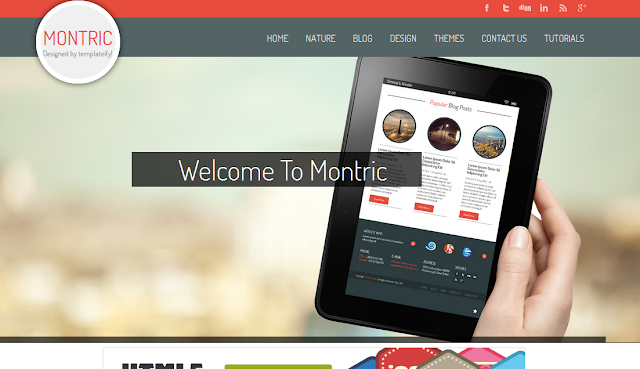
Montric is a magazine blogger template. Perfect for blogs, magazines, Montric is packed with fully functional scripts designed just enough to fit in the overall Blogger Magazine. The template uses flat design and clean cut elements in order to make the items on the web page stand out.
Download || Demo
Montric Magazine Blogger Template

Keilir Blogger Template

Download || Demo
Keilir Blogger Template

Downtown Blogger Template

Download || Demo
Downtown Blogger Template

Magzon Blogger Template

Magzon is a Blogger magazine template with a clean and elegant design . The template is ideal for the magazine, news and blog websites and can be very easily configured to use for any purpose. The theme is highly flexible and is incredibly easy to use. Created using the latest HTML5 and CSS3 techniques.
Download || Demo
Magzon Blogger Template

GoGreen Blogger Template

GoGreen is a multipurpose Blogger template with lots of new and indifferent functionalities. It is elegantly clean with a touch of FLAT UI but it is not totally flat. The dynamics of this theme are extremely pure and it gives a sparkling shine to your blogger site.
Download || Demo
GoGreen Blogger Template

WebDepot Blogger Template

The WebDepot Blogger Template is a combination of different color schemes which makes it look unique. This theme is ideal for Designing, web developing, and Magazine based website especially for those who stress more towards designing niche.
Download || Demo
WebDepot Blogger Template

WebMag Blogger Template

The WebMag Blogger Template is a robust and multi-purpose magazine theme for Blogger enabled websites. It is extremely efficient and has some highly customized functionality.
Download || Demo
WebMag Blogger Template

Elice – A Responsive Blogger Template

Download || Demo
Elice - A Responsive Blogger Template

Catalogspot

Download || Demo
Catalogspot

Boutique Blogger Template

Download || Demo
Boutique Blogger Template

Metro Classic Responsive Blogger Template

Metro Classic is an enhanced version of our previous Metro UI Blogger Template. Metro Classic is an old-school Windows 8 style Responsive Blogger template that is jam-packed with some tremendous features.
Download || Demo
Metro Classic Responsive Blogger Template

Bresponsive

Download || Demo
Bresponsive

Mintify Magazine Blogger Template

Mintify is a magazine blogger template with unique and amazing design, flaoting header, that will make your blog more proffesional.
Download || Demo
Mintify Magazine Blogger Template

Galauness

Galauness is free premium blogger template with Elegant, Clean and Minimalist Design
Download || Demo
Galauness


25 Best New Free Blogger Templates Released In 2013

We are into November and this year we have seen some amazing Free Blogger Templates released.More template designers are taking advantage of the latest coding techniques to create templates that would have been impossible a few years ago.In this post I will list the best 25 templates from this year.

In th list we tried to have a varity of template styles to suit all needs.Click the title of each template to go to the demo and download options.You can also check out the best free blogger templates from 2012.

25 Best Free Blogger Templates List


Montric Gallery Blogger Template


Montric is one of the best templates in the list with an amazing responsive design.The header detaches and floats on scroll while a full screen wide image slider displays your pictures.Curves are a real feature with rounded images and header logo.

Montric Gallery Blogger Template


X5 Advanced Blogger Template


X5 is a responsive template with a modern magazine style.X5 has a great slideshow and compact read more with thumbnails plus much more.

X5 Advanced Blogger Template


DoMag Bright Free Blogger Template


This is a three column blogger template with two right sidebars.The design is in a news magazine style optimized for SEO, Ads Reads and multiple content displays.A bright color scheme with a neat small image slider and auto read more.

DoMag Bright Blogger Template


True Pixel Blogger Template


True Pixel is a bright colored template packed with features.A left sidebar with tabbed section along with a sleek slider are among these.

True Pixel Bright Blogger Template


Sound Stage Musician Template


Sound stage is the perfect template for musicians and bands.The template has special sections for band information and music samples from SoundCloud.

Sound Stage Special Band Musician Template


Focused Blogger Template


Focused has a fresh simple look yet the design is fully responsive.Two columns with a left sidebar the header and menu has a float effect and the posts have a fixed read more with round thumbnail.

Focused - Responsive Blogger Template


Landis Under Construction Template


A special landing page template for when your blog is under construction.The template includes a countdown clock until your blog is launched and sharing options.

Landis : Under Construction Template


X9 Function Blogger Template


X9 is a template that will work great for you portfolio or design blog.The template has a dark colored design with a two column layout.

X9 Function Portfolio Blogger Template


Pixel Gallery Blogger Template


This is a gallery style template great for photography and design blogs.The posts are displayed by the main thumbnail with an overlay for post titles.

Pixel Gallery Blogger Template


Abstract Black Blogger Template


Abstract Black is a beautiful magazine template with social icons, image slider and footer columns among the features.

Abstract Black Blogger Template


Mommy Blog Blogger Template


A special template for mommy blogs with a fantastic design.The template has a great header image and uses the two column right sidebar layout.

Mommy Blog Blogger Template


Siren Blogger Template


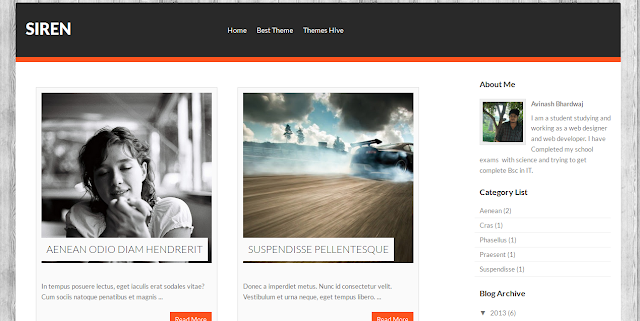
Siren is another gallery template for all you Photographers and Designers.A split header for ads and image thumbnail only read more are among the features.

Siren Gallery Magazine Blogger Template


Metro Portfolio Blogger Template


Metro has a modern dynamic design and can be use as a portfolio or a regular blog.The post has a drop down menu in the headers and special gadget section above the posts.

Metro : Portfolio Blogger Template


Kent Free Blogger Template


Kent is a magazine template with a two column right sidebar layout.A bright orange color throughout really makes it grab attention.The template uses the magazine style read more with post thumbnail.

Kent Free Blogger Template


Fizz Blogger Template


The Fizz template has a focus on being responsive so looking as good on your mobile device as your laptop.The header is fitted with sliding images while the layout is two column with a right sidebar.

Fizz Blogger Theme


Boldy Blogger Template


Boldy is a premium like template but is totally free.A huge image slider sits below a header that's fitted with search and social icons.There is a welcome message section above the posts that use a fixed read more.

Boldy Free Premium Blogger Template


Turn Blogger Template


Turn is a fresh style of gallery template.A slider with small thumbnails really grabs attention to display your images.The color scheme is dark using mainly black.

Turn Gallery Blogger Template


Simple Corp Blogger Template


Simple Corp has a real modern minimalist design while still being practical.The header has a social icon menu and a drop down menu for your links.Posts have a special date and details display on the home page while there is a welcome section for your images.

Simple Corp : Responsive Blogger Template


Black Form Blogger Template


This is another template that uses the basic magazine design but with a really slick header image.The features include a slider, fixed read more jump break and footer columns.

Black Form : Slick Blogger Template


Photography Gallery Free Blogger Template


Some great coding goes into the making of this template using jQuery to give posts on the home page their special display on hover.The header is built into the left sidebar while other gadgets sit below the posts.

Photography Gallery - Free Blogger Template


DCM Dark - Dynamic Gallery Template


his is a grid design template in many ways similar to the default Dynamic Views templates.The posts are displayed in grids of five and more auto load on scroll.

DCM Dark - Dynamic Gallery Template


Sentify Blogger Template


Sentify is a professional theme that will work well on all blogs.Social icons, slider and tabbed sidebar are among the features.

Sentify : Modern Blogger Template


Boutique Online Shop Blogger Template


A specialist template designed to be used as an online store.You can sell your products with the built in shopping cart.

Boutique : Online Shop Blogger Template


Plazify News Magazine Template


This is a three column news site style blogger template.With a three column layout the two right sidebars can be used for extra gadgets and to show more content.A featured posts slider can display your featured news and there is a drop down menu for your categories.

Plazify : News Magazine Blogger Template


Chalkboard Free Blogger Template


This is a simple template in the design of a chalkboard with the title fonts similar to chalk.A great template perhaps for educational blog or school related blog.
Chalkboard Free Blogger Template